OPPO mobile phone is known for their good camera quality and many super designs and features. However, data from OPPO phone can be deleted or lost due to many scenarios.
If you have also lost your precious data like photos, videos, audios, contacts, text messages, WhatsApp messages and attachments, call logs, etc. then you don’t need to sad as they can easily be recovered. In this tutorial, I will discuss 3 effective solutions on how to recover deleted data from OPPO phone.
Also Read: How To Recover Lost or Deleted Data From Oppo A37/A37F?
Let us first look at a real user practical scenario.
Practical Scenario
“I deleted all my photos from gallery by mistake how could I recover it. I use OPP A37f
I accidently deleted all my photos from gallery how I could recover it again. I use OPPO A37f”
Source: Tom’s Guide
Solution 1: Restore Lost/Deleted Data From OPPO Using Local Backup
You can effectively recover your deleted data from OPPO Mobile by using the local backup. But it is only possible if you have previously created a backup of OPPO data to it.
So, you have kept backup of OPPO data in local backup then follow the below-mentioned steps to restore lost or missing data from OPPO phone.
Step 1: On your OPPO phone you need to go to Settings > Additional Settings > Backup & reset > Local backup or you can go to Tools and then Backup and Restore.
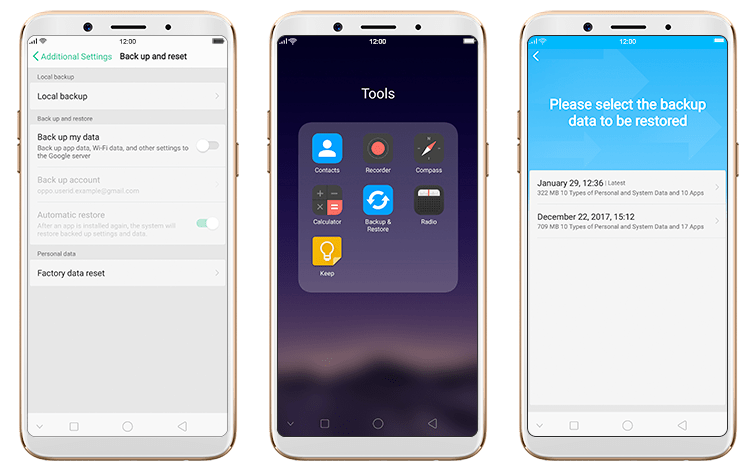
Step 2: Now, you can view all the data.
Step 3: Select the specific data that you wish to restore and then start the restoring process.
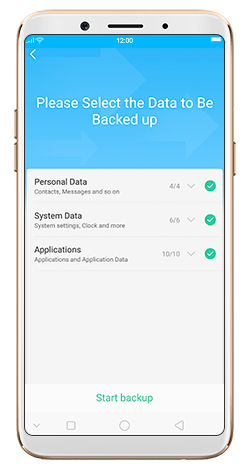
Note: Don’t reboot or power off your phone while restoring the backup file and when the backup is restored delete the backups that are no longer required.
Also Read: How To Recover Deleted or Lost Data From Oppo Reno
Solution 2: Get Back Deleted Data From OPPO Cloud
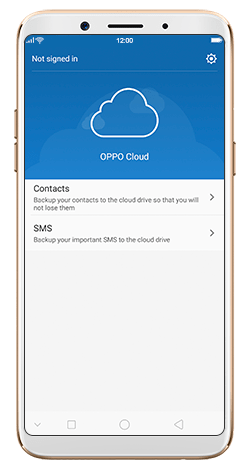
OPPO has provided its own Cloud feature where you can keep backup of important OPPO data. So if you have previously used this OPPO Cloud feature to back up OPPO phone then you can restore it very easily.
To do this you need to login to your OPPO Cloud and see the data type which you are finding are available there or not. If it is there then you can restore them from there.
You can also use this method to recover deleted files from OPPO mobile without computer.
Also Read: How To Recover Deleted or Lost Data From Oppo F9/F9 Pro
Solution 3: Retrieve Deleted Data From OPPO Phone Without Backup
OPPO Data Recovery is an appropriate software that can help you to recover deleted or missing data from OPPO smartphone even when you don’t have a backup.
This powerful tool recovers almost every type of data from OPPO phone such as contacts, videos, audios, call logs, SMS, WhatsApp conversation, voice/call recordings, notes, voice mails, documents, and more.
You can also recover permanently deleted photos, videos, call recordings, contacts, etc. from OPPO. This program also restores various types of data that have been erased from Android phone due to accidental deletion, virus attacks, system crashed, factory reset, black screen of death, ROM flashing, formatted SD card, screen broken, etc.
This Android Data Recovery tool can also be used to recover missing/deleted/lost data from the device’s internal storage or external SD memory card.
Note: Don’t add any new data on OPPO phone after the deletion, because this will overwrite the existing data that can lose the chance of successful OPPO phone’s data recovery.
Ending Words
Nowadays almost every user use smartphones to store their important device data and no one wants to lose this data from their smartphone. And to easily tackle unexpected data loss scenarios many users backup their device data to a safe place.
So, if you a have backup of deleted OPPO phone data then restore it from there. But if you don’t have backup then use OPPO Data Recovery tool to retrieve deleted data from OPPO phone without backup.
 Android & iOS Data Recovery